



Adb Instructions
Adb, short for Android Debug Bridge, is a versatile command line debugging tools, which has a variety of functions, such as tracking system logs, upload and download files, install and uninstall applications.
Preparation
In order to use adb, you need to:
-
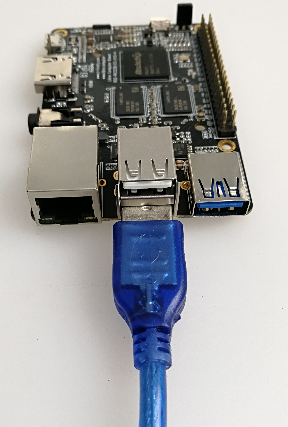
Use the male to male USB cable to connect host PC with the lower USB OTG port of the board:
-
In Android running on the board, select
Settings->USB, and check onConnect to PCoption. -
Install adb driver and command, depending on your OS.
Adb Installation in Windows
- Install Rockusb Driver.
- Download adb.zip, then unzip it to
C:\adbfor convenience.
Open a cmd window and run:
C:\adb\adb shell
You are entering the adb shell if everything goes well.
Adb Installation in Ubuntu
-
Install adb tool:
sudo apt-get install android-tools-adb -
Add device ID:
mkdir -p ~/.android vi ~/.android/adb_usb.ini # add the following line: 0x2207 -
Add udev rules for non-root user use:
sudo vi /etc/udev/rules.d/51-android.rules # add the following line: SUBSYSTEM=="usb", ATTR{idVendor}=="2207", MODE="0666" -
Reload udev rules:
sudo udevadm control --reload-rules sudo udevadm trigger -
Restart adb with normal user:
sudo adb kill-server
adb start-server
The next you can invoke adb directly, for example:
adb shellFrequently Used Adb Commands
Connection Management
List all connected devices and their serial numbers:
adb devicesIf there are multiple connected devices, you need to use the serial number to distinguish them:
export ANDROID_SERIAL=<device serial number>
adb shell ls
Also adb can be connected via the tcp/ip network.
adb tcpip 5555Adb will restart on the device side and listen on TCP port 5555. The USB cable can be disconnected from now on.
If the IP address of the device is 192.168.1.100, you the following command to connect:
adb connect 192.168.1.100:5555Once connected, you can run adb command as usual:
adb shell ps
adb logcat
Until you explictly disconnect adb:
adb disconnect 192.168.1.100:5555Debug
Getting System Log
Usage:
adb logcat [option] [Application label]For example:
# View all logs
adb logcat

# View only part of the log
adb logcat -s WifiStateMachine StateMachine
Gathering Bug Report
adb bugreport is used for error reporting, which gathers useful system information.
adb bugreport

# Save to local, make it easy to use editor view
adb bugreport >bugreport.txt
Running shell
Open an interactive shell:
adb shellRun shell command:
adb shell psApk Management
Install Apk
adb install [option] example.apk

options:
-l forward-lock
-r Reinstall the application to retain the original data
-s Install to SD card instead of internal storage
For example:
# install facebook.apk
adb install facebook.apk

# upgrade twitter.apk
adb install -r twitter.apk
If install fails, check the common reasons below:
INSTALL_FAILED_ALREADY_EXISTS: Try to add-rparameter to install again.INSTALL_FAILED_SIGNATURE_ERROR: APK signature is inconsistent, and it may be due to the different version of the signature and debug version. If you confirm the APK file signature is normal, you can use the adb uninstall command to uninstall the old application, and then install again.INSTALL_FAILED_INSUFFICIENT_STORAGE: There is not enough storage space.
Uninstall Apk
adb uninstall apk_nameFor example:
adb uninstall com.android.chromeThe name of the apk package can be listed with the following command:
adb shell pm list packages -f
...
package:/system/app/Bluetooth.apk=com.android.bluetooth
...
The apk file path and package name are separated by =.