AI Tutorial
AidLux Introduction
AidLux is a complete set of edge-end AI development toolkit, which can simplify the environment deployment on the Qualcomm platform and help developers accelerate the implementation of AI applications.
We recommend using AidLux for the development of AI applications. AidLux includes components such as AidLite, AidGen, AidGenSE, and AidStream.
Install Requirements
- Set AidLux apt source
# download public key
sudo wget -O- https://archive.aidlux.com/ubuntu24/public.key | gpg --dearmor | sudo tee /etc/apt/trusted.gpg.d/private-aidlux.gpg > /dev/null

# edit the source list
sudo vim /etc/apt/sources.list.d/private-aidlux.list

# add the private source provided by AidLux
deb [arch=arm64 signed-by=/etc/apt/trusted.gpg.d/private-aidlux.gpg] https://archive.aidlux.com/ubuntu24 noble main

# update apt cache
sudo apt update- Install AidLux requirements
# prepare a python virtual environment, the following demos are recommended to run in the virtual environment
sudo apt install python3-venv
python3 -m venv aidlux
source aidlux/bin/activate

# install opencv
pip config set global.index-url https://mirrors.ustc.edu.cn/pypi/simple
pip install opencv-python

# install requirements
sudo apt install aidlux-aistack-base aidrtcm
sudo apt install aid-lms aidlms-sdk aid-mms cmake g++ libopencv-dev

# DSP support
sudo apt-get install qcom-fastrpc1
sudo apt-get install qcom-fastrpc-dev

# GPU support
sudo apt-add-repository -s ppa:ubuntu-qcom-iot/qcom-ppa
sudo apt install qcom-adreno-cl1
sudo ln -s /usr/lib/aarch64-linux-gnu/libOpenCL.so.1 /usr/lib/aarch64-linux-gnu/libOpenCL.so

# support aidlite-sdk and aidgen-sdk
sudo apt install aidlite-sdk aidlite-*
sudo apt install aidgen-qnn240 aidgen-sdk
sudo apt-get install libfmt-dev nlohmann-json3-dev

apt download aidlite-sdk
mkdir extract
dpkg-deb -x aidlite-sdk_*.deb extract/
pip install extract/tmp/pyaidlitewhl/pyaidlite-2.5.0.284-cp312-none-any.whl
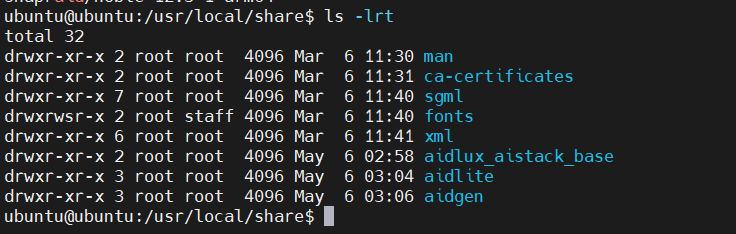
After installation, check /usr/local/share/, should have aidlite and aidgen there.
Model Farm
The Model Farm houses a large number of cutting-edge AI models that have been optimally adapted for use on Qualcomm NPU. Combined with the AidLux toolchain, it can help developers build their own AI applications more quickly on Qualcomm chips.
Addr: https://aiot.aidlux.com/en/models
Please visit Model Farm and register an account, which we will use in the following examples.
AidLite
AidLite is an AI execution framework designed to fully utilize the computing units (CPU, GPU, NPU) on the edge-side chips to accelerate the inference process of AI models.
Demos:
YOLOv8s
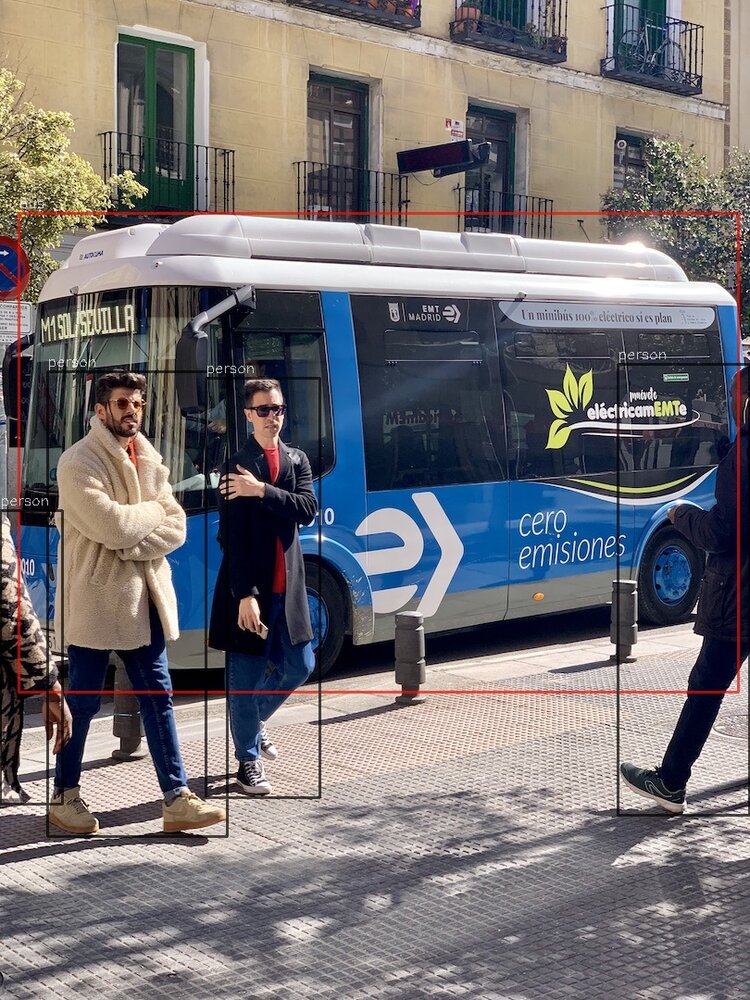
YOLOv8 is a cutting-edge, state-of-the-art (SOTA) model that builds upon the success of previous YOLO versions and introduces new features and improvements to further boost performance and flexibility. YOLOv8 is designed to be fast, accurate, and easy to use, making it an excellent choice for a wide range of object detection and tracking, instance segmentation, image classification and pose estimation tasks.
- Use mms command to download yolov8s model, need Model Farm account.
# login, enter the account and password of the Model Farm according to the prompt
mms login

# list and download model
mms list | grep YOLOv8s | grep 6490
mms get -m YOLOv8s -p INT8 -c QCS6490 -b QNN2.31 -d ./

# extract
unzip YOLOv8s_qcs6490_w8a8.zip- Move to the model directory, read the README and run the model according to the instructions
cd ./code
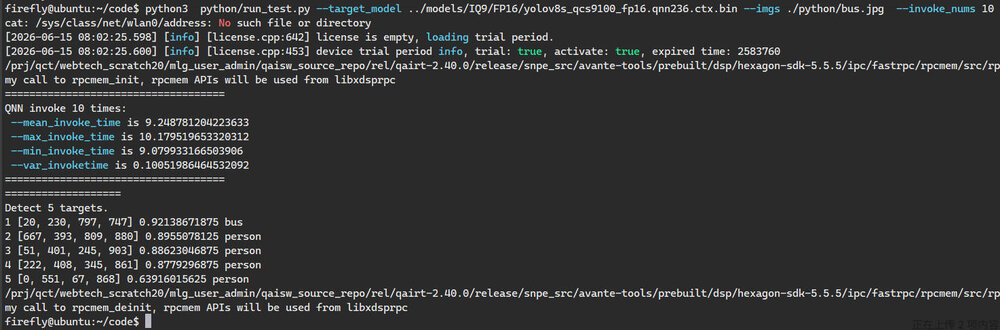
python3 python/run_test.py --target_model ../models/QCS6490/W8A8/cutoff_yolov8s_qcs6490_w8a8.qnn231.ctx.bin --imgs python/bus.jpg --invoke_nums 10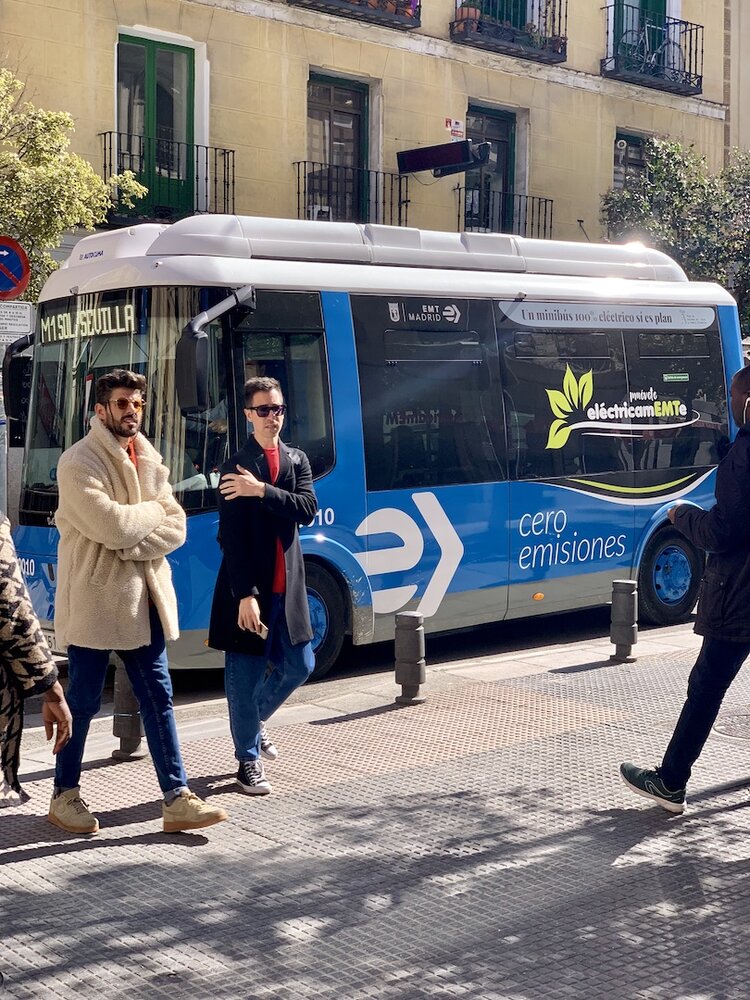
- Check the generated result code/python/result.jpg
ConvNeXt-Tiny
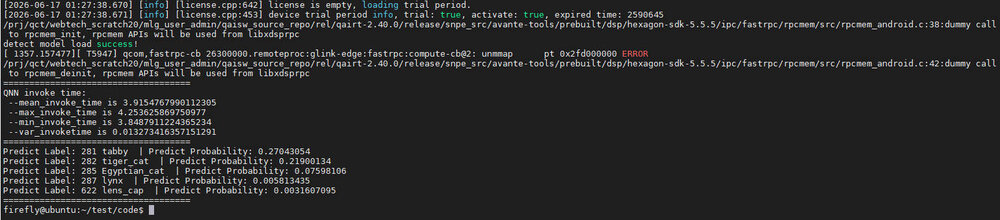
ConvNeXt-Tiny is the lightweight version of the ConvNeXt model family. It is a modern convolutional neural network (CNN) designed to reimagine the conventional CNN so that it can compete with today's popular Transformer models. ConvNeXt-Tiny retains the advantages of convolutional networks while introducing many design ideas from vision Transformers, such as deeper network structures, larger convolution kernels and LayerNorm. Compared with other models, ConvNeXt-Tiny has fewer parameters and lower computational requirements, but still delivers efficient image classification performance, so it is especially suitable for resource-limited environments such as mobile devices or edge computing.
- Use mms command to download ConvNeXt-Tiny model, need Model Farm account.
# login, enter the account and password of the Model Farm according to the prompt
mms login
# list and download model
mms list | grep ConvNeXt-Tiny | grep 6490
mms get -m ConvNeXt-Tiny -p W8A16 -c QCS6490 -b QNN2.16 -d ./
unzip ConvNeXt-Tiny_qcs6490_w8a16.zip- Move to the model directory, read the README and run the model according to the instructions
cd ./code
python3 python/run_test.py --target_model ../models/QCS6490/W8A16/convnext_tiny_w8a16.qnn216.ctx.bin --imgs python/tiger_cat.jpg --invoke_nums 10
Depth-Anything-V2-Small
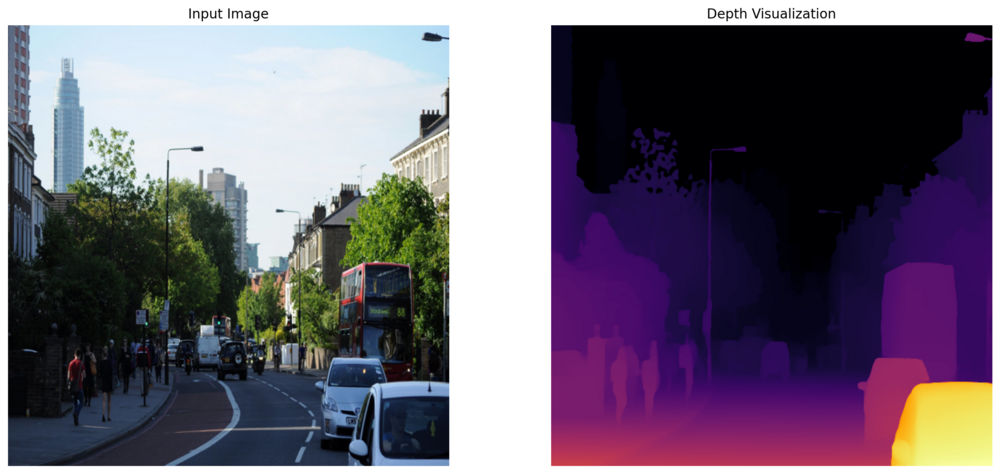
Depth-Anything-V2 is an advanced foundation model in the field of monocular depth estimation, designed to predict high-accuracy depth information from a single RGB image. Compared with the first generation, the V2 version significantly improves the capture of complex scenes and fine details by adopting a more powerful teacher model (based on DINOv2-Giant) and joint training on a much larger scale of synthetic data (595K images) and pseudo-labeled real data (62M images). It is not only more robust when handling transparent objects, highly reflective surfaces and low-light environments, but also achieves more than 10x the speed of similar diffusion models through an optimized inference architecture. Depth-Anything-V2 is available in multiple sizes, from lightweight (25M) to extra-large (1.3B), perfectly adapting to diverse needs ranging from embedded real-time applications to high-precision 3D reconstruction.
- Use mms command to download Depth-Anything-V2-Small model, need Model Farm account.
# login, enter the account and password of the Model Farm according to the prompt
mms login
# list and download model
mms list | grep Depth-Anything-V2-Small | grep 6490
mms get -m Depth-Anything-V2-Small -p W8A16 -c QCS6490 -b QNN2.40 -d ./
unzip Depth-Anything-V2-Small_qcs6490_w8a16.zip- Move to the model directory, read the README and run the model according to the instructions
cd code
pip install matplotlib
python3 python/run_test.py --target_model ../models/QCS6490/W8A16/depth_anything_v2_vits_518x518_qcs6490_w8a16.qnn240.ctx.bin --imgs python/demo01.jpg --invoke_nums 10

- Check the generated result
YOLO11l-Pose
YOLO11 pose is the latest pinnacle of Ultralytics pose estimation technology, covering a complete model lineup from ultra-lightweight (Nano) to high-accuracy (Extra-Large). The series adopts a brand-new backbone and neck architecture design, and achieves a significant breakthrough on the Pareto frontier of accuracy and inference speed by introducing the improved C3k2 module and the C2PSA mechanism. Compared with the previous generation, it can capture complex human poses more accurately and keeps keypoint tracking stable under severe occlusion. Whether for edge-side computing with extremely high real-time requirements, or offline analysis tasks pursuing the highest academic metrics, YOLO11 pose can provide the optimal 2D keypoint detection solution through its flexible scalability.
- Use mms command to download YOLO11l-Pose model, need Model Farm account.
# login, enter the account and password of the Model Farm according to the prompt
mms login
# list and download model
mms list | grep YOLO11l-Pose | grep 6490
mms get -m YOLO11l-Pose -p W8A16 -c QCS6490 -b QNN2.36 -d ./

unzip YOLO11l-Pose_qcs6490_w8a16.zip- Move to the model directory, read the README and run the model according to the instructions
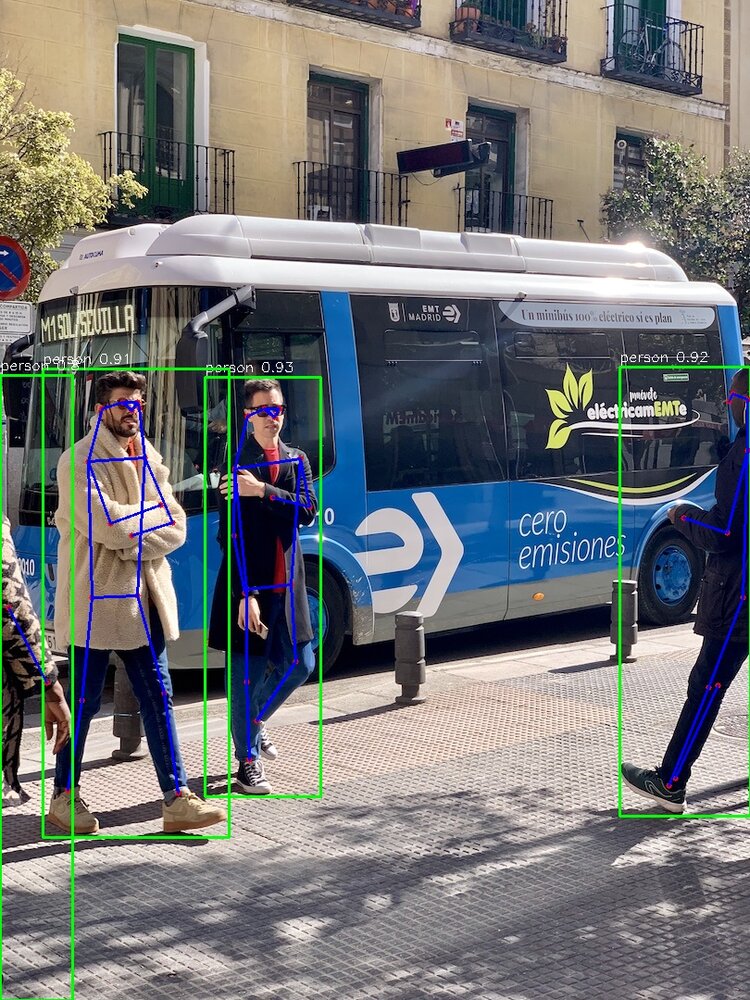
cd code
python3 python/run_test.py --target_model ../models/QCS6490/W8A16/cutoff_yolo11l-pose_qcs6490_w8a16.qnn236.ctx.bin --imgs python/bus.jpg --invoke_nums 10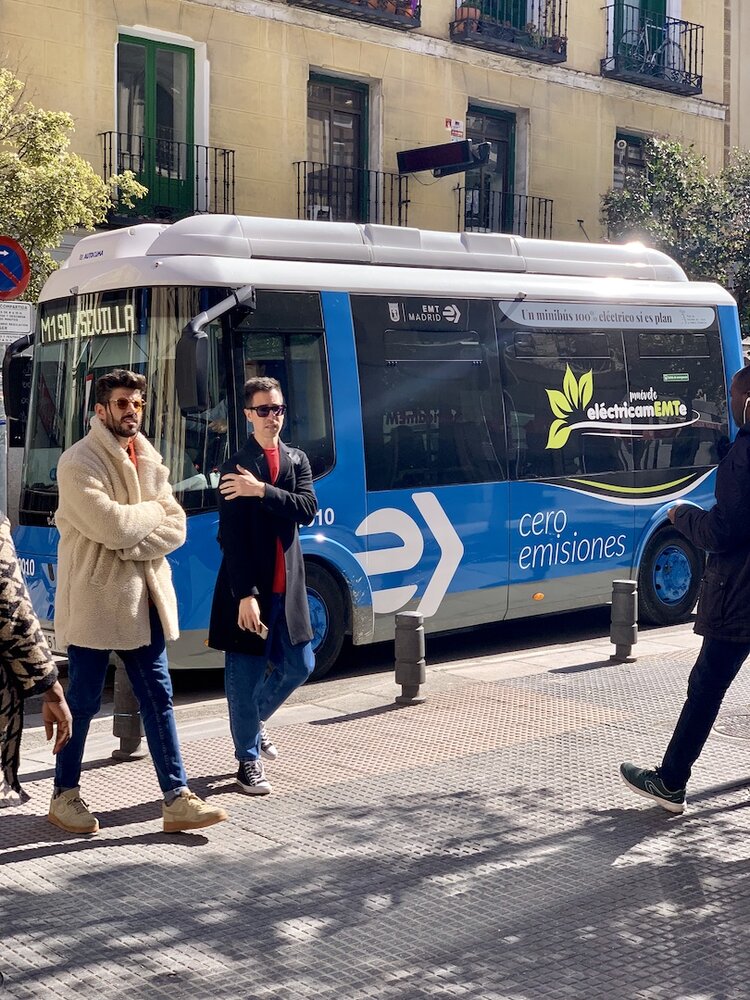

- Check the generated result
YOLO11s-obb
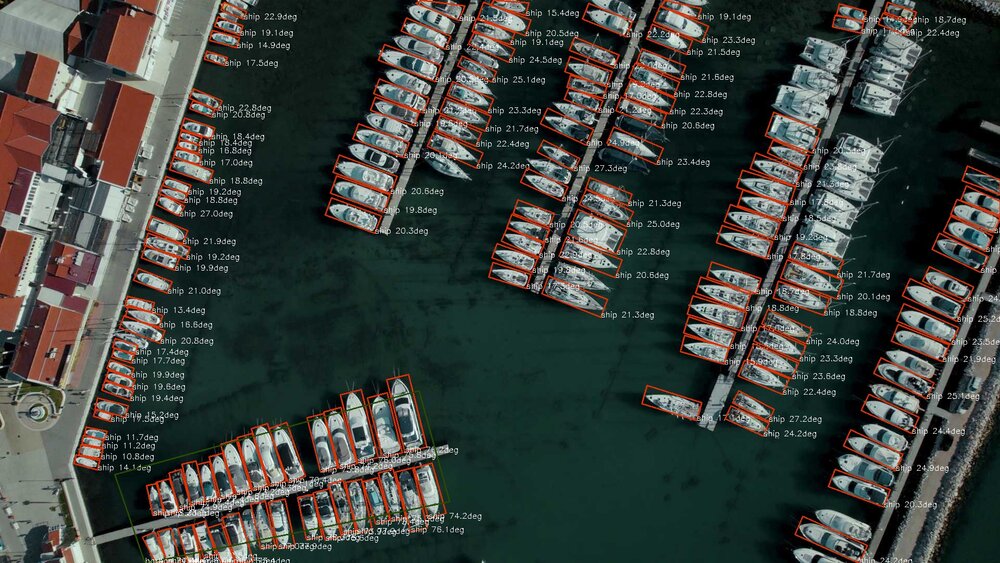
YOLO11s-obb is a lightweight Oriented Bounding Box (OBB) detection model in the YOLO family. It optimizes the traditional YOLO architecture to support efficient recognition of rotated objects, suitable for resource-constrained embedded and mobile applications.
Key features:
- Anchor-Free structure: adopts an anchor-free design, which simplifies the model and improves inference speed;
- Orientation-aware detection head: in addition to position and category, the model can also predict the rotation angle of the target, achieving accurate localization of rotated objects (such as drones, vehicles, road signs, text regions);
- Lightweight backbone: combines a lightweight backbone network with oriented detection modules, with low parameter count and computation, meeting near-real-time inference requirements;
- Strong scene adaptability: suitable for orientation-sensitive vision tasks such as aerial video analysis, industrial part inspection, and map element recognition.
- Use mms command to download YOLO11s-obb model, need Model Farm account.
# login, enter the account and password of the Model Farm according to the prompt
mms login
# list and download model
mms list | grep YOLO11s-obb | grep 6490
mms get -m YOLO11s-obb -p W8A16 -c QCS6490 -b QNN2.31 -d ./

unzip YOLO11s-obb_qcs6490_w8a16.zip- Move to the model directory, read the README and run the model according to the instructions
cd code
python3 python/run_test.py --target_model ../models/QCS6490/W8A16/cutoff_yolo11s-obb_qcs6490_w8a16.qnn231.ctx.bin --imgs python/boats.jpg --invoke_nums 10
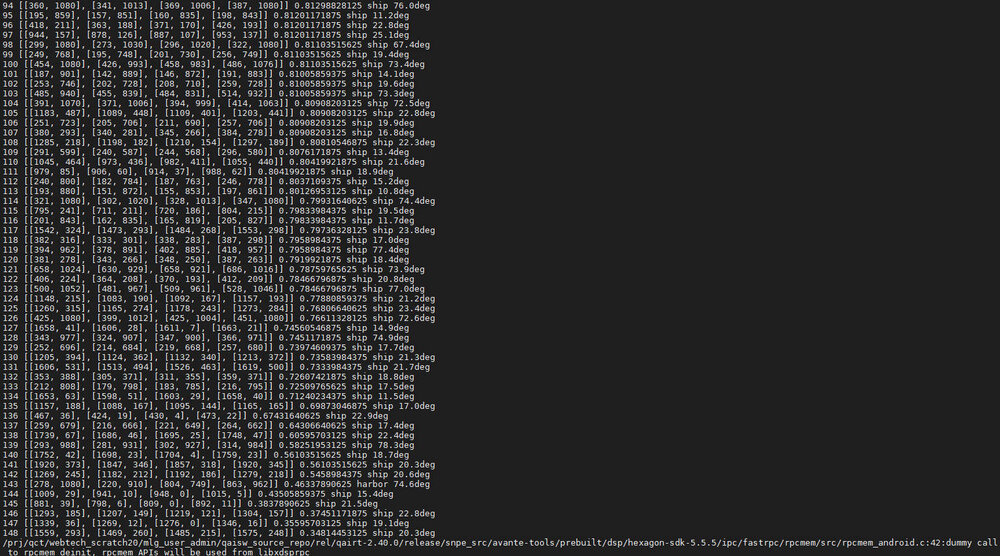
- Check the generated result
AidGen
AidGen is an inference framework built on AidLite and dedicated to generative Transformer models. It is designed to fully utilize the hardware computing units (CPU, GPU, NPU) to accelerate on-device inference of large models.
AidGen offers an atomic-level large model inference interface, which is suitable for developers to integrate large model inference into their own applications.
AidGen supports:
Large Language Model -> AidLLM inference
Multimodal Large Models -> AidMLM inference
Demos:
Qwen2-0.5B-Instruct
Qwen2 is the new series of Qwen large language models. For Qwen2, we have released a number of base language models and instruction-tuned language models with parameters ranging from 500 million to 7.2 billion, including a mixture-of-experts model.
Compared with the state-of-the-art open-source language models, including the previously released Qwen1.5, Qwen2 generally surpasses most open-source models in most benchmarks, and demonstrates competitiveness against proprietary models in language understanding, language generation, multilingual capability, coding, math, reasoning, etc.
- Use mms command to download Qwen2-0.5B-Instruct model, need Model Farm account.
# login, enter the account and password of the Model Farm according to the prompt
mms login

# list and download model
mms list | grep Qwen2-0.5B-Instruct | grep 6490
mms get -m Qwen2-0.5B-Instruct -p W4A16 -c QCS6490 -b QNN2.29 -d ./- Extract the model
mkdir Qwen2-0.5B-aidllm
unzip qnn229_qcs6490_cl1024.zip -d Qwen2-0.5B-aidllm/
cd Qwen2-0.5B-aidllm/qnn229_qcs6490_cl1024- Check the configuration file aidgen_config.json
      "token-penalty": {
        "version": 1,
        "repetition-penalty" : 1.1,
        "penalize-last-n": 128
      }
Check whether the token-penalty section of the configuration file contains the penalize-last-n parameter as shown above, if not, add it.
- Copy the demo project to the model directory, then build it
# copy the project directory to the model directory
cp -rfd /usr/local/share/aidgen/examples .

# build
cd examples
mkdir build && cd build
cmake ..
make- Run the demo
cd ../../
./examples/build/test_t2t aidgen_config.json "Give me a short introduction to large language model" qnn240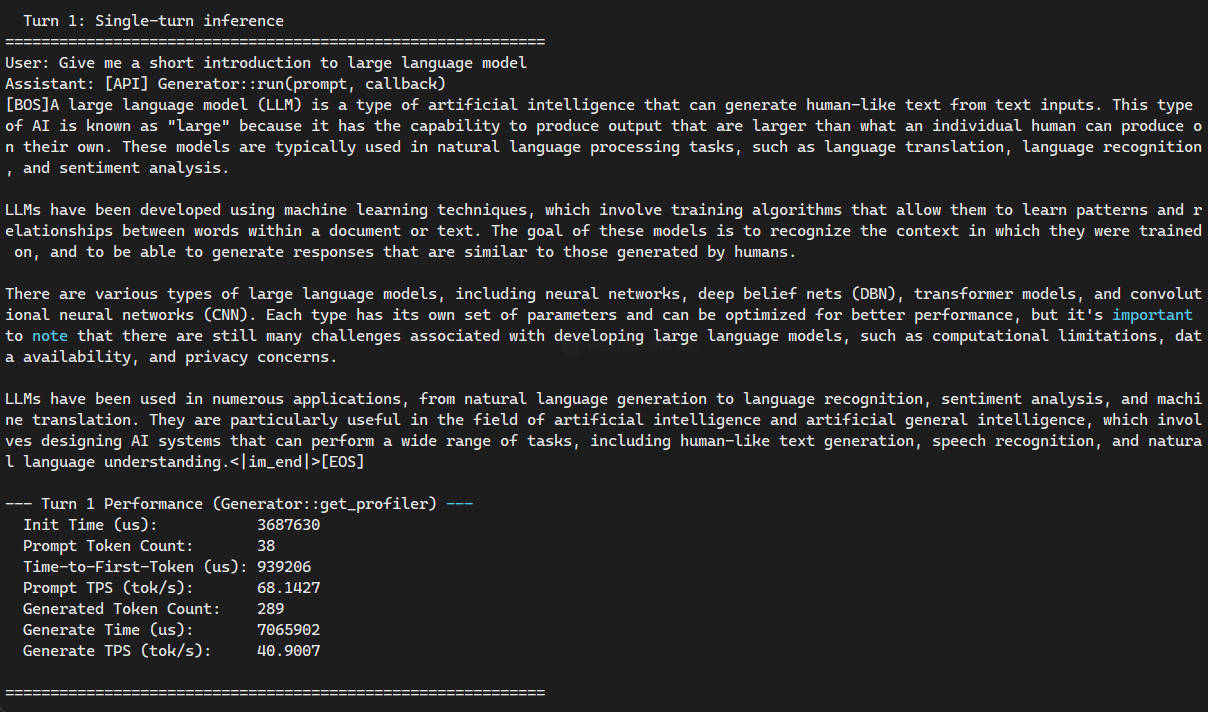
Qwen2.5-0.5B-Instruct
Qwen2.5 is the new series of Qwen large language models. The Qwen2.5 release includes multiple base language models and instruction-tuned language models, with parameter sizes from 0.5B to 72B. Compared with Qwen2, Qwen2.5 brings the following improvements:
- Significantly more knowledge, and great strength in both coding and mathematics, thanks to our specialized expert models in these domains.
- Significant improvements in instruction following, generating long texts (over 8K tokens), understanding structured data (e.g, tables), and generating structured outputs (especially JSON).
- More resilient to the diversity of system prompts, enhancing role-playing implementation and condition-setting for chatbots.
- Long-context support, handling up to 128K tokens and generating up to 8K tokens.
- Multilingual support, covering over 29 languages, including: Chinese, English, French, Spanish, Portuguese, German, Italian, Russian, Japanese, Korean, Vietnamese, Thai, Arabic, and more.
- Use mms command to download Qwen2.5-0.5B-Instruct model, need Model Farm account.
# login, enter the account and password of the Model Farm according to the prompt
mms login

# list and download model
mms list | grep Qwen2.5-0.5B-Instruct | grep 6490
mms get -m "Qwen2.5-0.5B-Instruct (QCS6490)" -p W8A16 -c QCS6490 -b QNN2.36 -d ./- Extract the model
mkdir Qwen2.5-0.5B-aidllm
unzip qnn235_qcs6490_cl2048.zip -d Qwen2.5-0.5B-aidllm/
cd Qwen2.5-0.5B-aidllm/qnn235_qcs6490_cl2048/- Copy the demo project to the model directory, then build it
# copy the project directory to the model directory
cp -rfd /usr/local/share/aidgen/examples .

# build
cd examples
mkdir build && cd build
cmake ..
make- Run the demo
cd ../../
./examples/build/test_t2t aidgen_config.json "Give me a short introduction to large language model" qnn240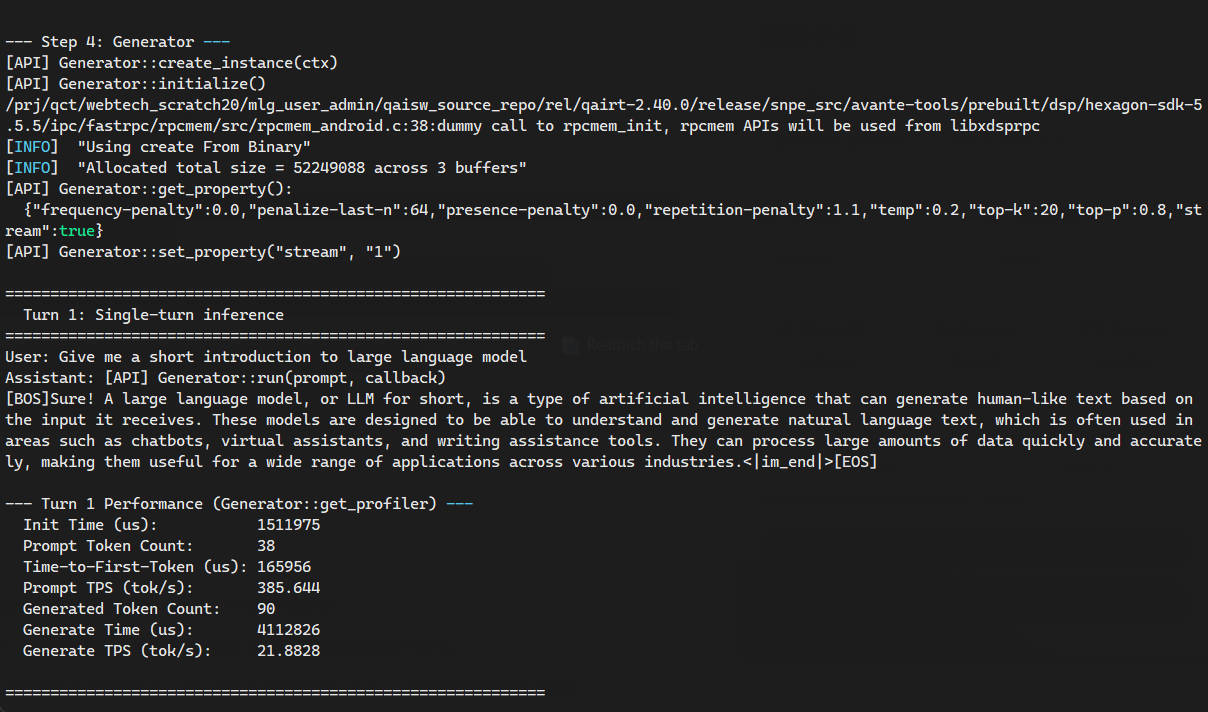
AidGenSE
AidGenSE is a generative AI HTTP service that is based on AidGen and has been adapted to the OpenAI HTTP protocol. Developers can call the generative AI through HTTP and quickly integrate it into their own applications.
The following is an introduction to the usage of AidGenSE:
- Prepare the environment
# install AidGenSE deb
sudo apt install aidgense
sudo aidllm system --sys linux --soc 6490- Common instructions
# list available models on the server
sudo aidllm remote-list api
# pull the model
sudo aidllm pull api qwen2.5-0.5b-instruct-qcs6490-qnn2.36-w8a16-qcs6490
# list downloaded local models
sudo aidllm list api
# start the local model
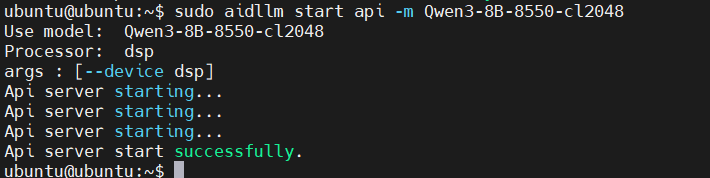
sudo aidllm start api
# stop the local model
sudo aidllm stop api- After "start api", you can use OpenAI HTTP requests to interact with AI model through <device ip>
AidVoice
AidVoice SDK is an AI inference SDK specifically designed for voice-related models launched by Aplux. It aims to simplify the development of core voice processing functions based on edge AI technology, allowing for flexible and rapid integration into intelligent applications. The SDK provides a unified and efficient API, supporting industry-leading voice processing AI models to meet the requirements of various business scenarios.
- Install requirements
sudo apt install aidvoice-sdk-
development flow diagram
-
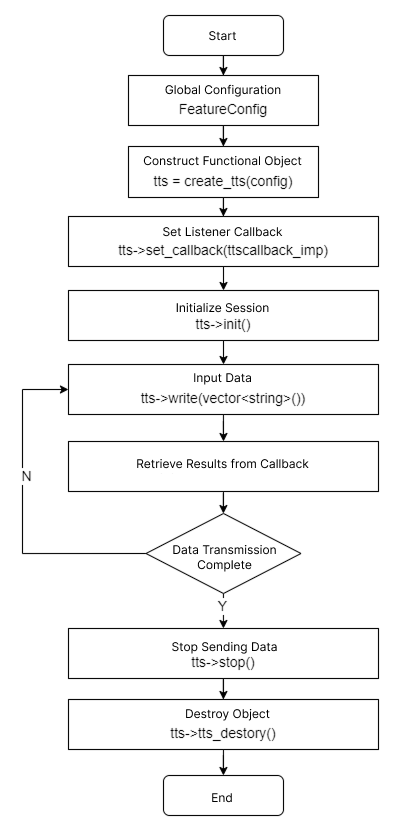
ASR
ASR: Recognizing Audio Files on Linux System
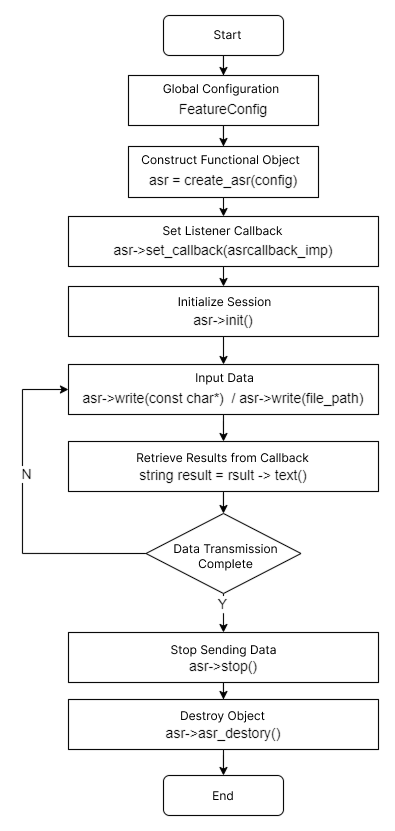
- TTS
TTS: Text-to-Speech on Linux System
- demo
Whisper-small(ASR)
Whisper-small is a mid-sized model in OpenAI’s Whisper series, striking a strong balance between model size and recognition accuracy. Compared to the tiny and base versions, Whisper-small includes more parameters and improved modeling capacity, resulting in higher transcription accuracy, especially in noisy environments, multilingual settings, and long-form speech. It is well-suited for use cases that demand higher recognition quality—such as meeting transcription, customer service, and speech-to-text platforms—while maintaining efficient performance for deployment on mid-tier computing devices.
- Use mms command to download Whisper-small model, need Model Farm account.
# login, enter the account and password of the Model Farm according to the prompt
mms login

# list and download model
mms list | grep Whisper-small | grep 6490
mms get -m Whisper-small -p W8A16 -c QCS6490 -b QNN2.40 -d ./- Extract the model
mkdir Whisper-small
unzip Whisper-small_qcs6490_w8a16.zip -d Whisper-small
cd Whisper-small- Copy the demo project to the model directory, then build it
# copy the project directory to the model directory
cp -r /usr/local/share/aidvoice/examples ./

# build
cd examples/asr/cpp
mkdir build && cd build
cmake ..
make- Run the demo
# -m model path
# -a audio path, optional if there's a default value
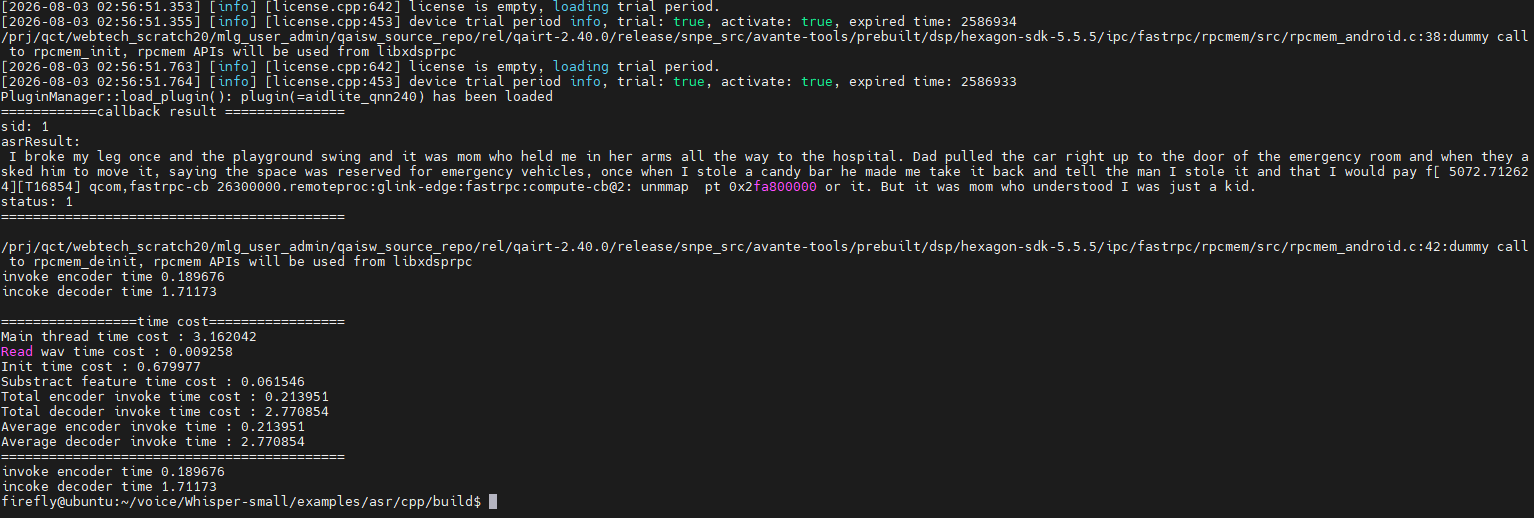
./test_asr_nostream -m ../../../../models/QCS6490/W8A16/- Check the generated result