

ClawChips: Introduction & Deployment Guide
What is ClawChips?
ClawChips is Rockchip's open-source reference solution for on-device agent deployment (repository: github.com/airockchip/clawchips). Its core is an on-device LLM gateway (RKClawServer) running on an RK3588 + RK1828 dual-chip edge device and exposing a standard OpenAI-compatible API, so that any agent harness can consume it as a standard LLM provider.
Unlike cloud-only deployments, the system routes requests between local and cloud execution based on task complexity. High-frequency, lightweight and latency-sensitive tasks are handled locally on the RK1828 at zero token cost, while long-context deep reasoning and complex task planning are delegated to the cloud. Cloud resources can therefore be concentrated on complex reasoning and high-quality generation, significantly reducing the overall interaction cost.
Architecture: Main SoC + Co-processor
Although the RK3588 integrates a 6 TOPS NPU, LLM inference is a classic memory-bandwidth-bound (memory wall) workload: during autoregressive decoding, every generated token requires a full traversal of the model weights, so inference time is dominated by memory access rather than arithmetic operations — publicly cited analyses put this share above 80%. On the RK3588, model weights reside in external LPDDR4/4X, whose bandwidth falls an order of magnitude short of what smooth inference on 7B-class models requires.
RK1828 addresses this by integrating high-bandwidth memory directly inside the chip package using 3D stacking:
| Item | RK3588 (Main SoC) | RK1828 (Co-processor) |
|---|---|---|
| Role | General-purpose SoC: OS, agent runtime, perception input / execution output, peripherals | Dedicated AI inference accelerator |
| NPU compute | 6 TOPS INT8 (general vision / detection) | 20 TOPS INT8 (Transformer-optimized; up to 40 TOPS at INT4) |
| Memory | External LPDDR4/4X | 5GB on-package 3D-stacked LPDDR4X (customized with GigaDevice) |
| Memory bandwidth | — | 1024 GB/s theoretical, approx. 20× the bandwidth of RK3588 external memory (Rockchip comparison) |
| Control cores | 4×A76 + 4×A55 | 3× independent 64-bit RISC-V cores (NPU task scheduling / preprocessing, no main-CPU load) |
| Power | — | ~5W typical at full inference load; stable operation with passive cooling |
| Interface / form factor | — | PCIe 2.0 x1 ×2, USB 3.0; M.2 2280 / SO-DIMM |
| Model ceiling | Small conventional models | 0.5B–7B LLM/VLM (Qwen, LLaMA, Gemma, DeepSeek, etc.) |
This architecture is particularly friendly to existing-device upgrades: the main SoC, operating system and peripherals all remain unchanged, and a single M.2 compute card adds LLM inference capability. Moreover, the RK1828 has its own memory and power domain, so inference does not consume main-SoC memory bandwidth. In essence, this is compute decoupling through a dedicated data path, rather than compute aggregation over a shared bus.
Three Core Modules and Data Flow
The architecture consists of three modules: RK1828 (on-device inference), RK3588 (agent runtime and data foundation), and the cloud LLM service (token package). Data flows as follows:
                  ┌──────────────────── RK3588 Main SoC ─────────────────────┐
                  │  Agent Harness (Nanobot) · Skills · Perception I/O ·     │
                  │  Private Data Storage                                    │
                  └─────────┬────────────────────────────────────┬───────────┘
       Lightweight / high-frequency /                   Complex / long-context
       latency-sensitive tasks                                    tasks
                            ▼                                      ▼
           RKClawServer (OpenAI-compatible gateway, :8081)       Cloud LLM
                            │
                            ▼
                     RK1828 Co-processor
(RKNN3 Toolkit Lite · 20 TOPS NPU)- Lightweight tasks: dispatched by the main SoC to RKClawServer and executed locally on the RK1828, generating no cloud calls;
- High-complexity tasks: uploaded to the cloud server through intelligent routing and processed by the cloud LLM;
- Memory routing: each request first reuses results already held in the local memory bank; a hit produces no new inference call;
- Bidirectional task scheduling forms an integrated edge-cloud collaboration, with full-link, privacy-preserving edge-cloud AI inference.
RKClawServer: A Complete Inference Runtime for Agents
RKClawServer (v0.7.0) is the hub of the solution: it exposes a standard OpenAI-compatible interface upward to the agent harness and manages the RKNN3 inference backend downward. Its capabilities are as follows:
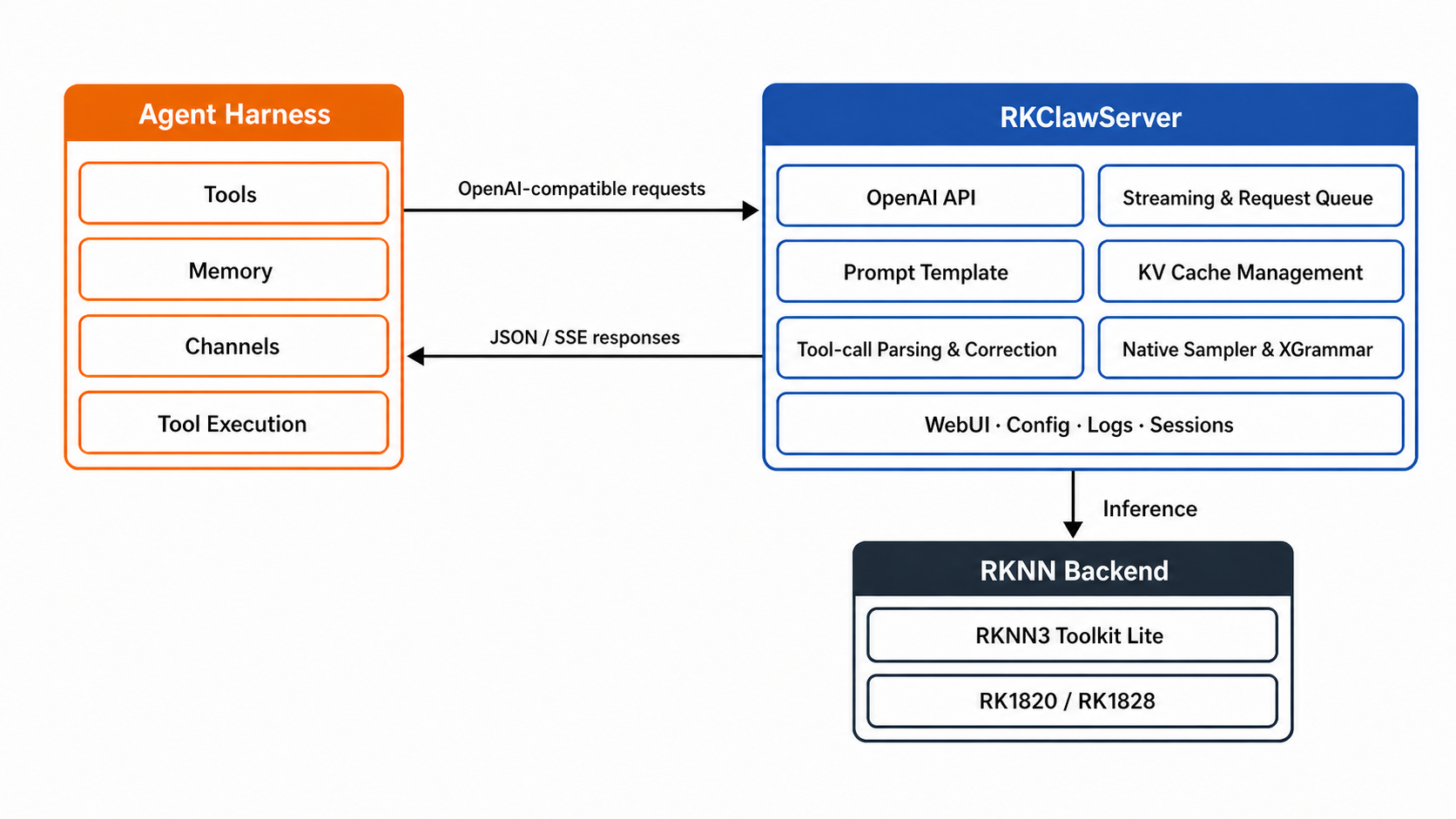
API layer (OpenAI-compatible)
| Endpoint | Purpose |
|---|---|
POST /v1/chat/completions | Multi-turn conversation, synchronous JSON and SSE streaming |
GET /v1/models | Query the currently loaded model |
GET /healthz | HTTP process liveness check |
GET /readyz | Readiness check for tokenizer / model / RKNN session initialization |
Optimizations for agent workloads (capabilities not provided by general-purpose inference servers):
- thinking output and tool-result pass-through;
- parallel tool calls with built-in ToolCall correction: malformed tool calls emitted by the model are repaired automatically instead of raising an error, which is critical to the robustness of multi-turn agent loops;
- optional XGrammar-constrained generation, guaranteeing valid structured JSON output;
- KV-cache persistence: KV caches are saved and reloaded automatically to reduce first-session latency (provided the system marker matches the current system prompt);
- request queueing, health checks, logging and session management, configuration management, and a built-in WebUI.
Operations dashboard: http://<device-ip>:8081/webui/, including a Dashboard (request / token / latency statistics over 1-hour to 30-day windows), session-log search with JSON export, server-log filtering, and dual-mode (form / TOML) configuration editing.
Agent Harness and the Skills Ecosystem
The agent layer uses Nanobot (component version 0.2.2), which by default connects to the local model at http://127.0.0.1:8081/v1 and exposes its WebUI on port :8765. Version 0.7.0 supports complete operation through the WebUI without using the command line.
On-device Skills (deployed under /userdata/skills):
| Skill | Capability | Key parameters |
|---|---|---|
| rk-ocr | Text extraction from images | — |
| rk-asr | Speech transcription | RTF ≈ 0.2, 1200 s per-task timeout, supports recordings of approx. 50 minutes |
| Qwen3-VL | Image understanding / scene description | Invoked automatically as a fallback when OCR cannot extract text |
Interaction channels: in addition to the WebUI, QQ (open-platform bot), WeChat (QR-code login) and Feishu (QR-code bot creation) are supported natively; a restart is required after configuration.
Browser capability (experimental): with the optional browser components installed, the on-device browser page can be mirrored into the WebUI, allowing the agent to open URLs, read page content and operate the browser — in effect, a browser runtime on the edge that can be driven by the agent.
Intelligent Routing and Token Savings
Cost control in ClawChips is achieved through three stacked mechanisms:
- Memory bank first: each incoming request is matched against the local memory bank first; a hit is reused directly and triggers no inference;
- Local offload: lightweight tasks (code comments, short-text rewriting, naming suggestions, etc.) are routed to the RK1828 at zero token cost;
- Cloud on demand: only complex tasks consume cloud tokens.
According to Rockchip's measurement methodology based on PinchBench, ClawChips reduces cloud model consumption by approximately 40%. This figure assumes a high proportion of lightweight tasks in the request mix (programming assistants, everyday Q&A, and similar workloads); for workloads dominated by long-document deep analysis, the actual saving will be noticeably lower. We therefore recommend validating the figure against your own request distribution before making a selection decision.
Deployment Walkthrough
Environment Requirements
| Item | Requirement |
|---|---|
| Device | RK3588 + RK1828, aarch64 |
| Operating system | Debian 12 or a compatible environment |
| Python | CPython 3.11 (/usr/bin/python3) |
| GLIBC | ≥ 2.27 (2.36 recommended) |
| Base service | rknn3.service in active state |
Environment self-check:
uname -m
cat /etc/os-release
/usr/bin/python3 --version
ldd --version | head -1
systemctl is-active rknn3.service
Three Installation Methods
| Method | Use case |
|---|---|
| Firmware flashing | First-time deployment, full-image flashing (RKDevTool V3.41 / upgrade_tool V2.55, MASKROM mode) |
| App Portal | Devices with an existing firmware image: open http://<device-ip>:18090 and install, then start ClawChips from the application list |
| Manual deployment | Development and custom integration; deploy RKClawServer and the agent harness separately |
Manual Deployment of RKClawServer
Prepare the model (default: AgentModel-V3.1-4B; all four files must come from the same export and must not be mixed across versions):
sudo mkdir -p /userdata/AgentModel-V3.1-4B-RKNN
sudo cp -a models/AgentModel-V3.1-4B-RKNN/. /userdata/AgentModel-V3.1-4B-RKNN/
cd /userdata/AgentModel-V3.1-4B-RKNN && md5sum -c md5sum.txt
Install and start (install.sh verifies the architecture, the Python version and the state of rknn3.service, installs Toolkit Lite 1.1.0 and RKClawServer, and starts rkclaw-server.service):
cd <release-package-root>/packages/rk-claw-server-0.3.2-linux-aarch64
sha256sum -c SHA256SUMS
sudo cp gateway.toml /clawchips/RKClawServer/gateway.toml
chmod +x install.sh && sudo ./install.sh
Verify (deployment succeeds when /healthz and /readyz return successfully and /v1/models returns the configured model information):
systemctl status rkclaw-server.service --no-pager
curl -sS http://127.0.0.1:8081/healthz
curl -sS http://127.0.0.1:8081/readyz
curl -sS http://127.0.0.1:8081/v1/models
Agent (Nanobot) Deployment
# Deploy on-device Skills
sudo mkdir -p /userdata/skills
sudo cp -a resources/skills/. /userdata/skills/

# Install and verify
cd <release-package-root>/packages/nanobot-ai-0.2.2-rk3588-20260815
chmod +x install.sh verify.sh
./install.sh && ./verify.sh --installed
The initial WebUI password is clawchips (written to ~/.nanobot/config.json — this must be changed in production deployments). Port overview: 8081 (RKClawServer) → 18090 (App Portal) → 18790 (Nanobot gateway) → 8765 (Nanobot WebUI).
For complete installation, configuration and troubleshooting procedures, see the official User Guide:
docs/Rockchip_RK1820_RK1828_User_Guide_ClawChips_EN.md(Chinese version:..._CN.md) in thegithub.com/airockchip/clawchipsrepository.